Guides
The Best POS System for Small Businesses in the UAE: A 2026 Buyer's Guide
Kyndle One Team · 12 September 2026 · 11 min read
The right point-of-sale system runs your shop quietly in the background; the wrong one taxes you a little every day. Here's how to choose the best POS for a small business in the UAE — VAT, e-invoicing, inventory, offline mode and pricing — without the sales spin.
Ask ten shop owners in the UAE how they chose their point-of-sale system and you'll hear the same story: they picked whatever the hardware supplier bundled with the cash drawer, or whatever a friend was using, and they've been quietly working around its limitations ever since. The till rings up sales — but the VAT report is a monthly headache, the stock count never matches the shelf, and pulling a simple profit figure means exporting to a spreadsheet on a Friday night.
A point-of-sale system is the single tool your business touches most. Get it right and it quietly runs your operations in the background. Get it wrong and it taxes you a little every single day. This guide walks through how to actually choose the best POS system for a small business in the UAE in 2026 — what to look for, the UAE-specific requirements most guides skip, and the honest trade-offs between the kinds of systems on the market.
A modern POS isn't a cash register — it's your operations hub
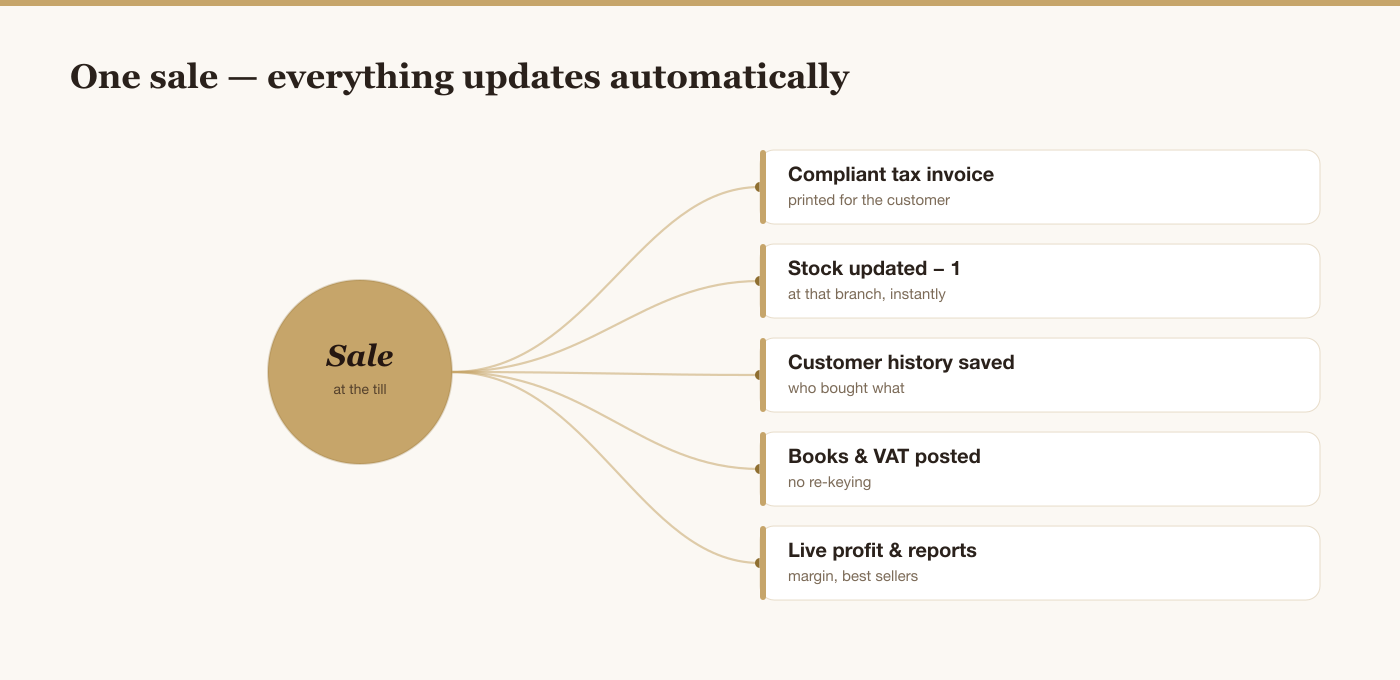
The phrase "POS system" still makes people picture a till and a receipt printer. That mental model is a decade out of date, and it's the reason so many businesses under-buy. A modern point-of-sale system sits at the centre of the business and touches almost everything:
- It takes the sale and prints a compliant tax invoice — not just a slip of paper.
- It updates stock automatically the moment an item sells, so your inventory is always live.
- It records who bought what, building a customer history you can market to.
- It feeds your accounting and VAT without re-keying a single number.
- It tells you your margin and best sellers in real time, not at month-end.
When you evaluate systems, judge them on that whole job — not just how fast they can process a payment. The cheapest till that only takes payments will cost you far more in manual work than a slightly pricier system that runs the operation for you.
The right question isn't "what's the cheapest POS?" It's "which system removes the most manual work from my week?"
There's no single "best" — it depends on your shop
Be wary of any article that crowns one universal winner. The best POS for a busy perfume boutique with three branches is not the best POS for a single-till grocery or a home-run accessories brand. Before you compare anything, get clear on your own situation:
- How many branches do you run now — and might you open more?
- How much stock do you carry, and does it need batch or expiry tracking?
- Are you VAT-registered, and do you issue invoices to other businesses?
- How tech-comfortable is your team, and how fast do new staff need to learn it?
- What's your realistic budget — including the hidden ongoing costs, not just the sticker price?
Hold your answers in mind as you read the criteria below. "Best" is simply the system that fits your answers most closely.
The 9 things that actually matter in the UAE
These are the criteria that separate a system you'll be happy with in three years from one you'll be fighting. The first two are specific to operating here — and they're exactly the ones global tools tend to get wrong.
1. Genuine UAE VAT compliance
Since 2018 the UAE has had 5% VAT, administered by the Federal Tax Authority, and your POS must handle it natively: apply the correct rate, produce a proper tax invoice (and a simplified tax invoice for retail), show your TRN, and give you VAT-ready figures at filing time. If VAT is something you reconcile by hand each month, the system is doing half a job. This is non-negotiable, not a nice-to-have — and our companion guide on how to choose accounting software that keeps your UAE VAT and books in order shows how the till and the books connect behind the scenes.
2. Readiness for e-invoicing (the 2027 mandate)
This is the criterion almost no buyer's guide mentions yet — and the one that will matter most over the next two years. The UAE is rolling out mandatory e-invoicing for B2B and B2G transactions, going live for larger businesses from 1 January 2027 and others from 1 July 2027, using the Peppol network and the PINT AE format. Choosing a POS that is already preparing for this — capturing the right customer and tax data now — saves you a scramble later. If you sell to other businesses or government buyers, ask any vendor directly what their e-invoicing plan is.
3. Inventory that's built in, not bolted on
Your POS and your stock are the same data — a sale is a stock movement. When inventory is a separate app you sync to, the two drift apart and you lose trust in both. The best systems track stock live from the same sale, warn you before you run out, and flag dead stock that's tying up cash. For shops carrying testers, batches or dated products, make sure it handles those too.
4. It works when the internet doesn't
Connectivity in the UAE is generally excellent — but "generally" isn't good enough when a customer is standing at your counter. A good cloud POS keeps taking sales offline and syncs automatically when the connection returns. Ask specifically what happens during an outage; the answer tells you how seriously the system was built.
5. Multi-branch from day one
Even if you have one shop today, choose as if you'll have three. Adding a branch should mean flicking a switch, not migrating to a new system. Look for per-branch stock and the ability to track inventory and stock transfers across multiple store locations, and one dashboard that rolls everything up — plus staff roles so a branch manager sees their store without seeing head-office numbers.
6. Arabic and English, AED, and local reality
A system built for the region should switch cleanly between English and Arabic (including right-to-left layouts), price in AED, and fit how business is actually done here — from WhatsApp being your main customer channel to the way people expect an invoice to look. Software that treats the UAE as an afterthought shows it in a hundred small frictions.
7. Reporting that shows profit, not just sales
Revenue is the easy number; it's also the one that hides the most. Your POS should show gross margin, best and worst sellers, stock value and slow movers — the seven numbers every shop owner should track to stay profitable, which reveal whether the business is really healthy. If the system can only tell you how much you sold, and not how much you kept, you're flying blind.
8. Your team can learn it in a morning
A powerful system nobody can use is worthless. Retail has real staff turnover, so new team members need to be ringing up sales confidently within a morning, not a week. When you trial a system, don't test it yourself — hand it to the person who'll actually stand at the counter and watch how quickly they get it.
9. Honest, predictable pricing
Watch the total cost, not the headline. Some systems are cheap up front but charge per transaction, so success quietly becomes expensive. Others lock essential features — inventory, extra users, reports — behind add-ons until the "cheap" plan isn't. Ask for the all-in monthly cost for your number of branches, users and volume, and compare that.
The kinds of POS systems you'll find here
Broadly, UAE small businesses choose between three types. None is universally right; each suits a different situation.
| Legacy on-premise till | Global cloud POS | UAE-built all-in-one | |
|---|---|---|---|
| VAT & tax invoices | Often manual / add-on | Varies; not always localized | Built in for the UAE |
| E-invoicing readiness | Rare | Depends on region focus | Actively preparing |
| Inventory | Separate module | Usually included | Native, from the same sale |
| Arabic / RTL | Sometimes | Often limited | First-class |
| Multi-branch | Costly to scale | Good | Good |
| Cost model | Big upfront licence | Subscription, sometimes per-transaction | Predictable subscription |
Legacy on-premise tills are familiar and work offline by default, but they age badly: updates are painful, data is trapped on one machine, and adding branches or new compliance rules is expensive. Global cloud POS platforms are polished and reliable, but many are built for the US or Europe first, so UAE VAT, Arabic and local invoicing can be patchy or bolted on. UAE-built all-in-one platforms are designed around exactly how business works here — VAT, e-invoicing, Arabic, AED — and increasingly bundle inventory, accounting and CRM so you avoid the real cost of running your shop on five separate apps.
See a UAE-built POS in action
Kyndle One runs point of sale, inventory, accounting and VAT in one place — with e-invoicing on the way for 2027.
Request a demo →Red flags to walk away from
- VAT is an "add-on." In the UAE, tax handling should be core, not an upsell.
- No clear e-invoicing answer. If a vendor looks blank when you ask about 2027, that's a sign.
- Per-transaction fees on top of a subscription. Your growth shouldn't be penalised.
- Your data is hard to export. If leaving is painful by design, be cautious going in.
- Inventory and sales are separate products you have to sync. That gap is where errors live.
- No offline mode. One outage at a busy hour will tell you why this matters.
A simple way to decide
You don't need a 40-column spreadsheet. Do this instead:
- Write your five answers from the section above — branches, stock, VAT, team, budget.
- Shortlist two or three systems that clearly handle UAE VAT and e-invoicing.
- Run a real trial — put through a normal day of sales, a return, and a stock update, and pull a VAT report and a margin report at the end.
- Have your counter staff use it, not just you.
- Ask for the all-in monthly price for your exact setup, and confirm there are no per-transaction charges.
Whichever system makes that trial day feel effortless — and gives you a clean VAT report and a real profit figure without a spreadsheet — is your answer.
How much does a POS system cost in the UAE?
Prices vary widely, but it helps to know the shape of the market so you can spot a fair deal. Broadly, there are three cost models:
- Upfront licence (legacy tills): a larger one-time payment for the software, often several thousand dirhams, plus paid upgrades later. Lower "monthly" cost, but you carry the maintenance and it ages.
- Monthly subscription (cloud POS): a predictable per-month fee, often tiered by branches, users or features. This is the model most modern systems use, and it keeps you on the latest version automatically.
- Subscription plus per-transaction fees: a low or free base plan that takes a small cut of each sale. This looks cheap at low volume and gets expensive as you grow — do the maths at your sales volume, not today's.
The honest way to compare is to work out your all-in monthly cost — software, every feature you actually need, your real number of users and branches, and any transaction fees — then compare that single figure across systems. A plan that looks cheap but charges extra for inventory, reports or a second user often ends up costing more than an all-in platform. And weigh it against the time saved: a system that removes a few hours of admin a week usually pays for itself many times over.
Do you need special hardware?
Less than you might think. Modern cloud POS systems run in a web browser or an app, which means they work on hardware you may already own — a tablet, a laptop, or a standard desktop. For a small shop you can often start with just a device and a receipt printer, and add a cash drawer and barcode scanner when you need them.
This is a real advantage over legacy tills that demand proprietary, locked-in equipment. Being able to start on an ordinary tablet keeps your setup cost low and lets you add a lane or a branch cheaply. When you evaluate a system, check what hardware it supports and whether you're free to buy standard, off-the-shelf peripherals rather than one supplier's expensive kit.
Where Kyndle One fits
Kyndle One is a UAE-built, all-in-one platform for retail and service businesses, and it's designed around every criterion above. Point of sale, inventory, purchasing, customers, accounting and VAT live in one place, so a sale updates your stock, your books and your customer history at once — no syncing, no spreadsheets. It handles 5% VAT and proper tax invoices natively, works in English and Arabic, prices in AED, keeps selling offline, and scales cleanly across branches. It's also actively preparing for UAE e-invoicing, with the data model already in place to produce compliant B2B and B2G invoices ahead of the 2027 mandate.
We built it because we watched too many good shops lose hours a week to tools that didn't talk to each other. Whether Kyndle One is the right fit depends on your five answers — but if you want one calm system that runs the whole operation instead of five that don't, it's built for exactly that.
The bottom line
The best POS system for your small business in the UAE isn't the flashiest or the cheapest — it's the one that fits how you actually work, handles UAE VAT and the coming e-invoicing rules without drama, keeps your stock honest, and lets your team get on with serving customers. Judge systems on the whole job they do, run a real trial before you commit, and choose the one that quietly removes the most work from your week. That's the system that pays for itself.
Related guides
Frequently asked questions
What is the best POS system for a small business in the UAE?+
There's no single winner — the best POS depends on your number of branches, stock complexity, whether you're VAT-registered, your team's tech comfort and your budget. The right choice is the system that handles UAE VAT and e-invoicing natively, keeps your inventory live, works offline, and removes the most manual work from your week. Judge it on the whole job it does, not just payment speed.
How much does a POS system cost in the UAE?+
It varies by model. Legacy tills charge a larger one-time licence; most modern cloud systems charge a predictable monthly subscription tiered by branches, users or features; and some 'free' plans take a per-transaction cut that gets expensive as you grow. Compare the all-in monthly cost for your exact setup — including every feature you need — rather than the headline price.
Does a POS system handle UAE VAT?+
A good one does, natively — applying the correct 5% rate, producing proper tax invoices and simplified tax invoices, showing your TRN, and giving you VAT-ready figures at filing time. Be cautious of systems where VAT is a manual step or a paid add-on; in the UAE, tax handling should be a core feature.
Do I need special hardware for a cloud POS?+
Usually not much. Modern cloud POS runs in a browser or app, so it works on a tablet, laptop or desktop you may already own. A small shop can often start with just a device and a receipt printer, adding a cash drawer or barcode scanner later. This avoids the locked-in, proprietary equipment that legacy tills require.
Will my POS need to support UAE e-invoicing?+
If you sell to other businesses (B2B) or government (B2G), yes. The UAE is introducing mandatory e-invoicing over the Peppol network using the PINT AE format, going live for larger businesses from 1 January 2027 and others from 1 July 2027. Choose a POS that is already preparing for it so you're capturing the right data now and avoid a scramble later.
Run your business smarter with Kyndle
Point of sale, inventory, accounting and AI insights in one calm place.
Request a demo