Guides
POS for Multiple Branches: How to Run Several Stores from One System
Kyndle One Team · 12 September 2026 · 10 min read
Open a second shop and every till becomes an island — separate numbers, blind stock, prices that drift. Here's what a POS system for multiple branches must do to run several stores as one calm business.
The first shop taught you the ropes. The second one teaches you a harder lesson: that the tidy little setup running your original store doesn't stretch to two. Suddenly you're phoning the other branch to ask what's in stock, comparing two separate sales reports that don't add up the same way, and discovering that a price you changed on Monday only changed in one place. Each till has quietly become an island.
Running several stores well isn't about working harder across more locations — it's about running them all from one system instead of many. This guide covers exactly what a POS system for multiple branches needs to do, how to decide what head office controls versus each store, and how to move from a drawer of separate tills to a single, calm operation you can see from anywhere.
Why a single-store setup breaks at two
The habits and tools that work beautifully for one shop fail in specific, predictable ways once you add a location:
- Your numbers stop adding up. Two separate systems produce two separate versions of the truth, and no reliable way to combine them.
- Stock becomes a guessing game. You can't see what the other branch has, so you lose sales or overstock to be safe.
- Prices and products drift apart. A change made in one store doesn't reach the others, so the same item costs two different amounts.
- Reporting turns into admin. Every question — "how did we do this week?" — means pulling and merging figures by hand.
- You lose visibility. You can't be in two places, so without a shared system you're managing the second store blind.
Two shops on two systems is just twice the work. Two shops on one system is a business.
Signs you've outgrown single-store tills
Not sure whether you need a proper multi-branch system yet? These are the tell-tale signs:
- You phone the other branch to check whether something is in stock.
- The same product ends up priced differently across stores by accident.
- Your weekly numbers take an evening of merging spreadsheets to produce.
- Stock sits unsold in one store while another turns customers away.
- You genuinely can't say which branch is your most profitable.
- Opening the next store fills you with dread rather than excitement.
If two or three of these ring true, the problem isn't your team — it's that your stores are running as separate islands instead of one connected business.
What "multi-branch POS" actually means
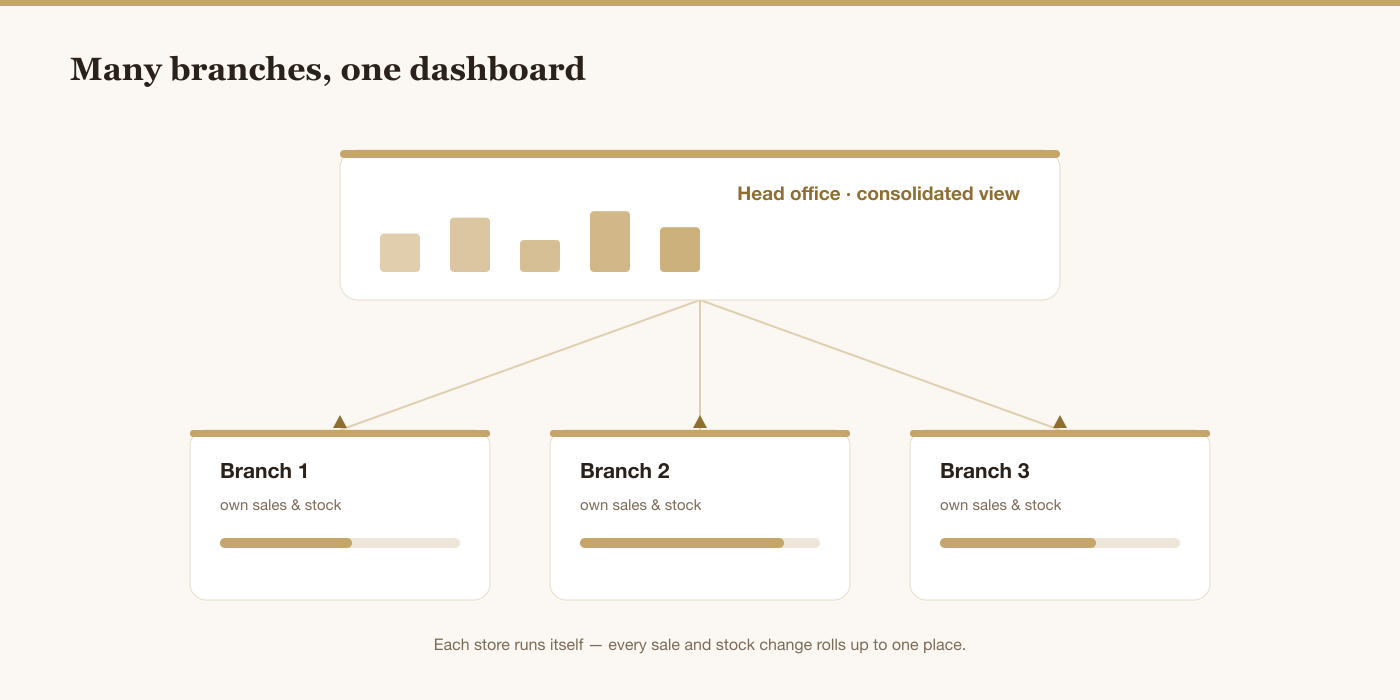
A multi-branch (or multi-store) POS is one system that every location works from, holding data per branch while rolling it all up centrally. Each store rings up its own sales, holds its own stock and has its own team — but there's a single shared product catalogue, one customer database, and one dashboard where head office sees everything together. The opposite of several disconnected tills is not one giant shared till; it's one system that knows which branch is which.
This is the natural next step up from choosing any good till. If you're still weighing systems in the first place, start with our guide to choosing the best POS system for a small business in the UAE, then use the checklist below to make sure whatever you pick will grow with you.
A quick note on terms: multi-location, multi-store and multi-branch are usually used interchangeably for running several outlets under one business, while multi-brand means running distinct brands too. Here we focus on the system that ties several outlets together — the one platform every store works from.
The shape of it is simple: each store runs its own sales and stock, and every one of those actions rolls up into a single shared view for head office. Visually, it looks like this:
What a POS for multiple branches must do
These are the capabilities that separate a system that scales gracefully across locations from one you'll be fighting the moment you open store number two.
1. One shared catalogue, with per-branch flexibility
Every product should exist once, centrally, so a new item or a price change is made in one place and applies everywhere. At the same time, the system should allow sensible per-branch differences — a product available in one store but not another, or a location that runs its own promotion — without breaking the single shared record.
2. Per-branch stock, updated live from every sale
Each branch needs its own real-time stock count that drops the moment an item sells there. This is the heart of multi-store operations, and it deserves its own attention — our guide to tracking inventory across multiple stores goes deep on doing it right, from per-location counts to cycle counting.
3. Stock transfers between branches
When one store is short and another is overstocked, moving stock between them should be a recorded, two-sided action — out of one branch, into another — not an informal "I dropped a few over." Done properly, transfers keep both branches' numbers correct and turn your whole network into one flexible pool of stock.
4. Consolidated reporting, with per-branch drill-down
You need to answer two questions instantly: how is the whole business doing, and how is each branch doing. A good multi-branch POS rolls every store's sales, margin and performance into one view, then lets you drill into any single location. No exporting, no merging spreadsheets — the very reporting that reveals the seven numbers every shop owner should track to stay profitable, now across every store at once.
5. Staff roles and permissions per branch
More locations mean more people, so control matters. A branch manager should see and run their own store without seeing head-office numbers or other branches; a cashier should sell but not adjust stock or prices. Clear roles — plus a record of who did what — are how you keep control as the team grows across sites.
6. It keeps selling offline
Each branch must be able to keep taking sales if its connection drops, then sync automatically when it returns. With multiple locations you multiply the chances of an outage somewhere, so offline resilience per branch isn't optional.
7. Consolidated UAE VAT and accounting
All your branches roll up to one VAT registration with the Federal Tax Authority, so your system should produce consolidated VAT figures and books across every location, while still letting you see each store. Feeding sales straight into accounting software that stays in sync with every sale means multi-branch bookkeeping doesn't multiply your paperwork.
8. One customer database across branches
A customer who buys in one store should be recognised in another. A shared customer database means loyalty, history and marketing work across your whole network — not siloed per till — which is a large part of the point of running several stores under one brand.
9. Adding a branch takes minutes, not a migration
The real test of a multi-branch system is opening the next store. It should mean switching on a new location and assigning staff — not buying, installing and reconciling a whole new setup. If growth means a painful migration each time, the system is holding you back.
Central control vs branch freedom: where to draw the line
The art of running multiple stores is deciding what head office standardises and what each branch controls. A useful default:
| Head office controls | Each branch controls |
|---|---|
| The product catalogue and standard prices | Day-to-day sales and its own till |
| Who has which role and permissions | Local stock counts and receiving |
| VAT settings and accounting | Requesting transfers and reorders |
| Reporting standards and targets | Local promotions (within limits) |
Standardise what needs to be consistent for the brand and the books; let each branch own the things that are genuinely local. A good system lets you set that balance rather than forcing everything to be identical or letting everything drift.
A practical example: your head office sets the price of a bottle of perfume so it's the same in every store, and owns the VAT and accounting settings so the books are clean. But the branch in a busy mall might run a weekend promotion, count its own stock each morning, and request a transfer when a best-seller runs low — all without head office micromanaging. The system enforces the shared rules automatically while giving each store room to run its floor. That balance is what keeps a growing chain both consistent and responsive, and it's almost impossible to strike when every store is on its own disconnected till.
Run every branch from one screen
Kyndle One gives each store its own stock and sales while head office sees the whole business — with transfers, roles and consolidated VAT built in.
Request a demo →Common mistakes when running multiple stores
- Each branch on its own system. The root cause of almost every multi-store headache — separate numbers can't be combined.
- Managing stock per store in isolation. Without transfers and a shared view, you'll be out of stock in one place and overstocked in another.
- One person doing all the reporting by hand. It doesn't scale and it's always out of date.
- No per-branch permissions. Everyone seeing and changing everything is how errors and losses creep in.
- Choosing a till that can't scale. Picking a single-store system and bolting on locations later costs far more than choosing one built to grow.
Moving from separate tills to one system
If your stores are already on disconnected setups, here's a sensible way to bring them together:
- Clean and merge your catalogue into one shared product list with consistent names, SKUs and prices.
- Choose one system built for multiple branches — check it against the nine points above.
- Do an accurate opening stock count at each branch so every location starts from truth.
- Set up branches, staff roles and permissions to match how you actually operate.
- Run one store on it first, confirm sales, stock and reports behave, then roll out to the rest.
- Switch off the old tills once every branch is live on the shared system.
Done in that order, the move is calm and low-risk — and the day it's finished, you can finally see your whole business on one screen.
How much does a multi-branch POS cost?
Most cloud systems that support multiple branches charge a monthly subscription, usually scaled by the number of locations and users rather than a big one-time licence per store. That's a real advantage over legacy tills, where each new branch often means buying and installing another full setup. As always, compare the all-in monthly cost for your real number of branches, tills and staff — and check that essentials like per-branch stock, transfers and consolidated reporting are included rather than paid add-ons. Weigh it against the hours you'll stop losing to manual merging and stock-chasing; for most growing retailers, one connected system pays for itself well before the second or third store.
Where Kyndle One fits
Kyndle One is built to run many branches as one business. Every store works from a single shared catalogue and customer database, holds its own real-time stock, and rings up its own sales — while head office sees everything rolled up in one dashboard, with the ability to drill into any location. Stock transfers between branches are a proper two-sided action; staff roles keep each manager to their own store; VAT and accounting consolidate across the whole network; and each branch keeps selling offline if its connection drops. Opening your next store is a switch you flick, not a system you rebuild.
Because point of sale, inventory, customers and accounting are one connected platform rather than separate tools stitched together, growing from one shop to several doesn't multiply your admin — it just adds a location to the picture you already see.
The bottom line
A POS system for multiple branches isn't a bigger till — it's a single source of truth that lets each store run itself while you see and steer the whole business from one place. Insist on a shared catalogue, per-branch stock with transfers, consolidated reporting and VAT, per-branch roles, and the ability to add a location in minutes. Get that right, and every new store you open makes the business stronger instead of harder to manage — which is exactly how growth is supposed to feel.
Related guides
Frequently asked questions
What is a multi-branch POS system?+
A multi-branch (or multi-store) POS is one system that every location works from. Each store rings up its own sales and holds its own stock, but there's a single shared product catalogue, one customer database, and one dashboard where head office sees everything rolled up. It's the opposite of running each shop on its own disconnected till.
Can one POS system run multiple stores?+
Yes — that's exactly what a multi-branch POS is built for. It tracks stock and sales per location in real time, supports transfers between branches, consolidates reporting and VAT across the business, and lets you set staff permissions per store, so you can run several shops from one screen without merging spreadsheets.
How do you manage stock across multiple branches?+
Give each branch its own real-time stock count that updates from every sale, and treat transfers between stores as a recorded two-sided action (out of one branch, into another). Set reorder points per store and count in regular cycles. The key is one shared system rather than each branch keeping separate numbers.
Do all branches share the same products and prices?+
They share one central catalogue, so a new product or a price change is made once and applies everywhere — which keeps the brand and the books consistent. A good system also allows sensible per-branch differences, such as an item stocked in one store only, or a local promotion, without breaking the shared record.
How much does a multi-branch POS cost?+
Most cloud multi-branch systems charge a monthly subscription scaled by locations and users, rather than a large one-time licence per store. Compare the all-in monthly cost for your real number of branches, tills and staff, and check that per-branch stock, transfers and consolidated reporting are included rather than paid add-ons.
Run your business smarter with Kyndle
Point of sale, inventory, accounting and AI insights in one calm place.
Request a demo